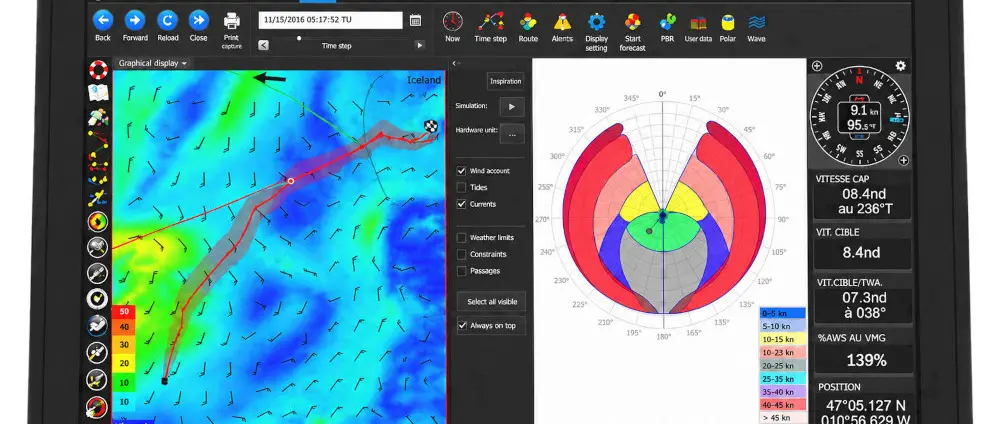
A display for the boat's existing navigation computer
Digital Yacht has added the S135, a 13.3-inch high-brightness touchscreen intended for PC-based navigation and monitoring aboard recreational and professional vessels. The manufacturer lists the screen in its current marine-electronics range and featured the wider S-Series family among products introduced around METSTRADE 2026. Its published specification includes 1920-by-1080 Full HD resolution, a nominal 1,000-nit brightness rating, capacitive touch control and direct operation from 12- or 24-volt DC systems. For owners and builders of 12-to-23.99-metre yachts, the interest lies in the flexibility to choose a separate marine computer and display rather than buying an integrated navigation unit for every helm function. The S135 is not itself a complete chartplotter, AIS transponder or radar. The actual functions depend on the equipment and software connected to it. That distinction is essential when discussing what the product adds to the bridge and what must still be specified separately.
What the maker actually lists
Digital Yacht's official product information calls the S135 a 13.3-inch Full HD touchscreen with a 10-point projected-capacitive interface, anti-glare treatment and viewing angles listed as 160 degrees horizontally and vertically. Its front panel is described as IP65/NEMA 4, with IK07 impact resistance, and the manufacturer specifies operation from 12 or 24 volts DC. Published power consumption is stated at no more than 13 watts at 12 volts under the stated conditions. These characteristics can support a clean, relatively compact installation, but prospective buyers should consult the full data sheet before committing to a dashboard cutout. An environmental rating for the front face does not mean the entire unit is waterproof when cables and rear connections are exposed. Neither does a brightness rating guarantee identical legibility under every combination of sun angle, polarised eyewear and display content. Physical testing at the intended helm position remains worthwhile.
The appeal of a separate display and computer
A conventional multifunction display combines a screen with its own processor and marine software. A separate-monitor arrangement can offer more flexibility because the navigation computer, instruments and display may be selected for different reasons. Owners who already use specialist electronic-charting software may want a larger or brighter screen without replacing the entire computing system. A second monitor can also give the navigator a dedicated view of particular information, depending on the available video outputs and software licensing. However, the benefits are not automatic. A separate computer creates requirements for boot behaviour, operating-system updates, connectivity and a safe response to power loss. The S135's suitability should therefore be assessed as part of the complete navigation architecture. The owner should know which device is generating the charts, what supplies the data and how essential functions remain available if the computer or the new screen stops working.
Brightness is more than a marketing number
A claimed 1,000 nits of screen brightness is relevant to helms where daylight may make a conventional indoor monitor difficult to read. Yet screen legibility also depends on reflections, contrast, viewing angle and the design of the chart or instrument page. Sunlight reflected from the water can be particularly challenging, while an enclosed wheelhouse may need effective dimming after dark. An anti-glare surface can help, but it cannot compensate for poor placement or uncontrolled reflections from nearby glazing. Buyers should inspect the actual display with realistic navigation content rather than rely on photographs showing an attractive, high-contrast interface. The result should be usable by the helmsperson without drawing unnecessary attention away from external lookout responsibilities. Display design needs to consider both bright approaches to port and dim night passages, where excessive illumination can undermine dark adaptation.
What ten-point touch control means onboard
The manufacturer specifies a 10-point capacitive touchscreen and says it can be used for chart interaction such as panning and zooming. Multi-touch is familiar from consumer devices, but the conditions aboard a moving yacht are different. Operators may be wearing gloves, bracing themselves or trying to make a precise selection while the boat is pitching. Digital Yacht says touch operation has been designed with gloved use in mind, although actual performance should be checked with the gloves and operating environment expected on the boat. Touchscreens are convenient for many interactions, but they should not force a navigator to depend on fine movements for every essential task. A carefully designed helm may retain physical controls, appropriate mounting and software shortcuts for common functions. Ergonomics, accessibility and reliability matter more than simply increasing the number of gestures a screen can recognise.
Inputs and the importance of a compatibility check
Digital Yacht lists video connections including HDMI, VGA and composite AV, alongside USB connectivity for touchscreen operation. The precise cabling and configuration should be verified for the product version being purchased. A video connection alone does not necessarily transmit touch commands back to the connected computer, and an installation may require a separate USB path and software configuration. Owners planning to connect a marine PC, radar display output or existing multifunction system should obtain a confirmed compatibility statement before ordering. Some information may depend on the originating device's output format, permissions or software settings. A display may show a picture successfully while its touch interface remains unavailable. The best installation plan includes a connection diagram, power specification, mounting drawing and a commissioning test using the actual connected devices.
Low power consumption in a larger electrical picture
The manufacturer's published figure of no more than 13 watts at 12 volts suggests that the display itself need not be a major domestic electrical load. That can be helpful when considering additional screens on a yacht that spends time at anchor or under sail. However, the power used by the connected computer, network equipment and sensors must be included in the real electrical budget. A display that consumes relatively little power does not make a full electronic-navigation installation energy free. Owners should also distinguish normal consumption from start-up behaviour, and confirm whether the unit has suitable protection and voltage tolerance for the vessel's power distribution. A well-engineered circuit should permit safe isolation for servicing and avoid placing critical information on an unprotected or easily disconnected accessory connection. The relatively modest screen load is useful, but only within a complete and reliable installation.
Weather resistance needs careful interpretation
The S135's published IP65/NEMA 4 front-panel rating is a practical detail for dashboard integration. It indicates a defined level of protection at the front surface when installed according to the manufacturer's requirements; it should not be read as permission to leave the entire monitor unprotected in any exposed position. Rear connectors, cable entries and mounting interfaces may have different conditions. In a flybridge installation, the designer needs to consider direct spray, temperature, water tracking behind the panel and the ability to access the unit for service. A sheltered wheelhouse presents a less severe but still demanding environment of humidity, vibration and occasional water contact. Owners should request installation guidance for the precise mounting location and not confuse a front-panel resistance specification with a complete environmental assessment of the bridge.
Planning the dashboard before cutting it
A 13.3-inch screen can be attractive where dashboard space is limited, particularly on a yacht that needs more than one source of navigation or monitoring information. Yet dimensions alone do not settle placement. The navigator must be able to see the display without obstructing external vision, and there should be enough distance for comfortable reading. Touchscreen control may require the display to be within reach, which can conflict with an ideal viewing distance on some bridges. Glare from windows, vibration from the structure and access to rear cables all need attention. The installer should inspect the manufacturer's cutout and mounting details and consider whether future removal will be possible without dismantling surrounding joinery. A tidy helm is successful when it remains easy to operate and maintain, not merely when every screen fits elegantly into a photograph.
The relationship with safe navigation practices
A modern display can present a great deal of information, but it cannot relieve the crew of responsibility for maintaining an effective lookout and using suitable navigation methods. Electronic charts, AIS overlays, radar data and weather information all have different sources and limitations. A touch display may make those data easier to view, yet their accuracy depends on sensors, software, updates and the surrounding installation. The crew should understand which information is available, which is missing and how to continue safely if the electronic system is unavailable. Redundancy is particularly important on a yacht making longer passages. Owners should ask whether the S135 is intended as an additional display, a primary viewing surface or one of several independent stations. The appropriate answer will influence power supplies, backup equipment and the training needed to use the complete system.
What owners should confirm before buying
A clear procurement checklist includes the current model specification, electrical requirements, screen dimensions, mounting arrangement, warranty conditions and confirmed connections to the intended computer or multifunction unit. The owner should also ask about support for the operating system and navigation software being used. Any price quoted in a regional product catalogue may vary by market, taxes and installation labour, so the complete project cost should be obtained from the supplier. If the monitor is intended to replace an older screen, it is important to check cable access and whether existing video resolutions are supported. A new display is often straightforward to admire but less straightforward to integrate into a boat that already contains years of electrical modifications. A thorough survey can prevent the common problem of buying a screen that is visually attractive yet incompatible with the owner's preferred software and controls.
Why the S135 matters to the luxury-yacht helm
The S135 adds a current manufacturer-defined option for a compact, bright PC-linked marine touchscreen with practical power and environmental specifications. Its features may appeal to builders of premium cruising yachts and owners modernising an enclosed or semi-protected helm. The official information supports discussion of resolution, brightness, touch capabilities, voltage, power draw and the limits of its front-panel protection. It does not support claims that the unit independently navigates, replaces certified bridge equipment or guarantees superior performance over every other monitor. Those are separate issues to assess in a complete system. The wider industry development is the continued availability of specialised marine displays that can be paired with flexible computing and navigation arrangements. For yacht owners, the sensible measure of success is an interface that remains readable, compatible and dependable over many seasons of use.
Sources and image credits
Reporting based on Digital Yacht first-party S135 November 2026 marine touchscreen product page and detailed specifications.
Lead photograph: Digital Yacht S135 Adds a 13.3-Inch High-Brightness Touchscreen to the Helm — original manufacturer photograph. © Digital Yacht Ltd Original official image source.